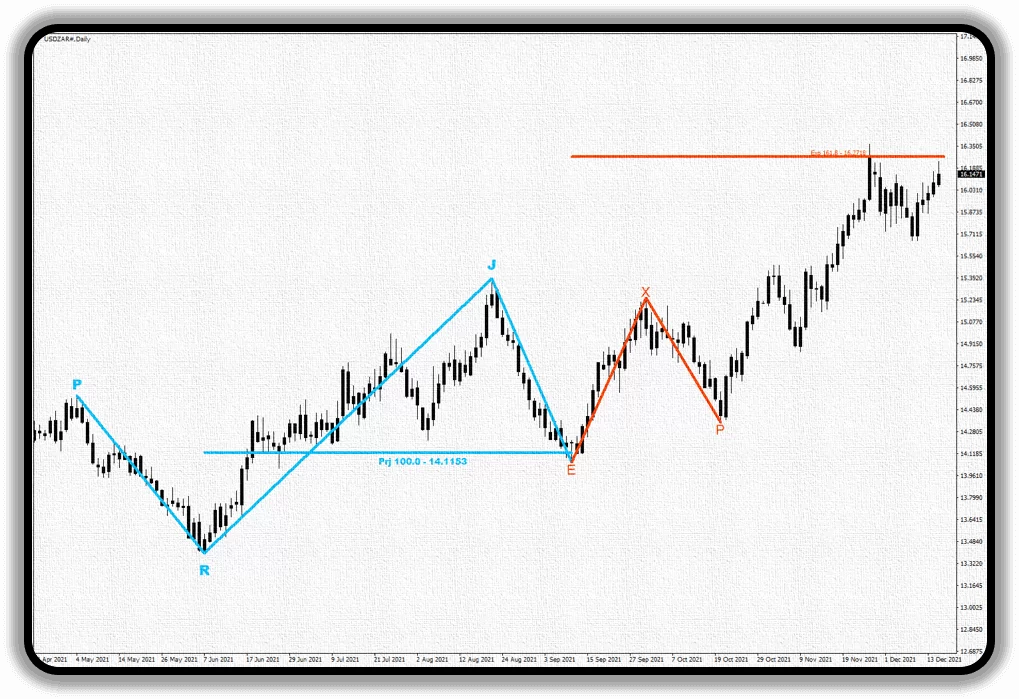
MetaTrader 4 Fibonacci(Exp,Prj) indicator is a MetaTrader 4 (MT4) indicator that automatically draws Fibonacci Expansion and Projection levels on your charts.
With the alert feature, you will instantly receive notifications from your computer, tablet, mobile phone and smart watch when the price comes to any of the Fibonacci(Exp, Prj) levels.
With the MyAssistant feature, a screenshot of your graph will be sent to you as a notification via Telegram.
Currency: All Forex Pairs, All CFDs, All Cryptocurrencies and All Stocks
Time Frames: All
Notifications: Telegram, Desktop, Laptop, Mobile Phone, Tablet, Smartwatch
Language Options: English and Turkish
Free Trial: 7 Days Free
MyAssistant Feature: Available
MT4 FIBONACCI(EXP, PRJ)features
Wherever you are, your Fibonacci Indicator is there.
MyAssistant
The most favorite feature of investors using our MetaTrader 4 indicators is;
the MyAssistant notification feature.
So what is this myassistant feature?
MyAssistant is an FxCanli MetaTrader 4 software that takes a screenshot of your chart when your indicator generates an alert, sends it to your Telegram along with the notification, and allows you to create your own signal service.
You will be sent an alert with a screenshot via telegram when;
The price reaches the Fibonacci Expansion (61.8, 100.0, 161.8) levels or the levels you set,
The price reaches the Fibonacci Projection (100.0) levels or the levels you set,
How many different MetaTrader 4 accounts can I use your indicators when I buy them?
Licenses can only be assigned to a single MetaTrader 4 account and cannot be transferred to another MT4 account. If your MetaTrader 4 number changes for any reason, your license CANNOT be changed.
2
What is Unlimited License Update?
If you have purchased all the indicators and your MetaTrader 4 account number changes for any reason (broker change etc.), your license update request will be made within 7 days.
3
Will the updates and new features coming to the indicator I have purchased be paid?
No, you will not pay any additional fees for new features and updates.
4
How do I install the MyAssistant software on my computer?
When you purchase one of our indicators, you will be directed to a page with video narration for MyAssistant software installation.
5
How can I use it for free for life?
You can contact us via WhatsApp about the lifetime free usage plan.